 Glowproof
Privacy policy
Glowproof keeps your photos, notes and settings on your iPhone. There is no account and no server for them. The app does not analyze faces, show ads or track you across apps. Purchases run through Apple and a third-party billing service. This page explains each point in plain language.
Who is responsible for your data?
The developer of Glowproof is responsible for this policy. Glowproof has no account and no server of its own, so the developer does not receive your photos, notes or settings.
What data does Glowproof store, and where?
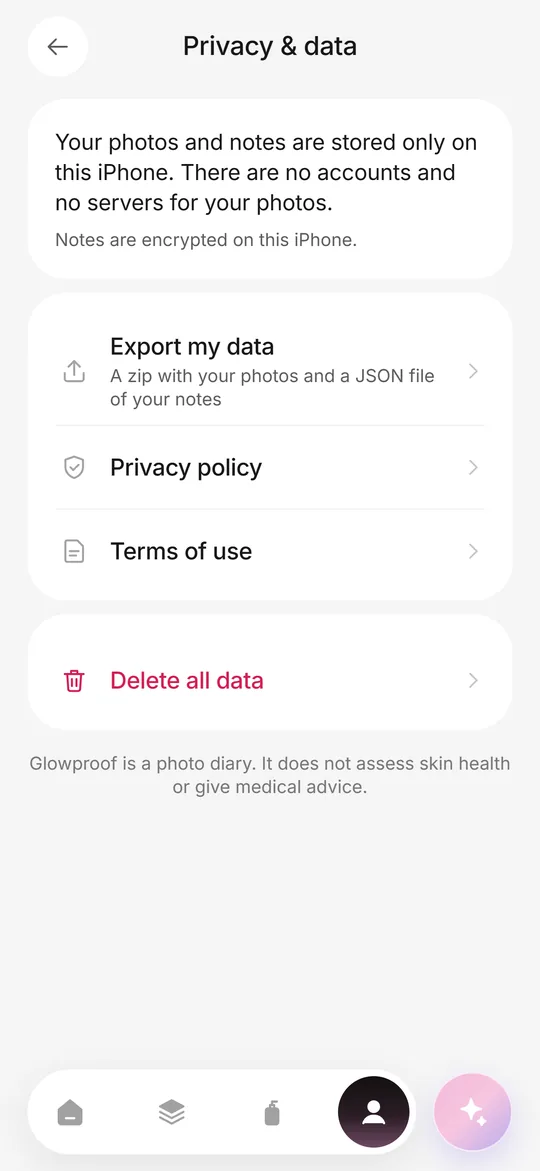
Your photos, the light check values of each photo, notes, tags, area notes, routine steps and check-offs, Product Trials and ratings, challenge dates and settings stay on this iPhone. Photos sit in private app storage and are excluded from iCloud backup by default. The private storage of the app is protected by iOS Data Protection, which encrypts files on the device.
There is no account and no server for this data. The developer cannot see it and cannot recover it if you delete the app or erase your data.
What does the app do with photos?
Glowproof checks only the light of a photo (brightness, light from one side and warmth) to compare it with your Day 1 photo. It does not detect or analyze faces, does not assess skin and does not use Face ID, ARKit or any face data API.
What leaves my device?
Purchases. Subscriptions and the lifetime purchase are processed by Apple. To check whether Pro is active, the app uses a third-party billing service, which receives an anonymous app user identifier and your App Store transaction details and keeps them under its own privacy policy. The billing service does not receive your photos or notes.
Things you share. A Glow Card, an invite link or an export goes only where you send it through the iOS share sheet. An invite link contains only the nickname you typed and a start date.
What does Glowproof not do?
It shows no ads, does not track you across other apps or websites, does not sell data and contains no third-party analytics or advertising SDKs. The app keeps a small list of feature events on your iPhone only. The list is included in your export and erased with your data.
Which permissions does it ask for?
Camera is used only on the Glow Check screen. Photos access works through the system picker, so the app gets only the photo you choose. Adding to Photos is requested only when you tap Save to Photos. Notifications cover only the reminders you turn on, and they are scheduled on your iPhone.
What choices do I have?
Export my data and Delete all data are in Me, then Privacy and data. Deleting erases photos, notes, settings and scheduled reminders from the iPhone. Subscriptions are managed in your Apple ID settings. You can also exclude or include photos in device backup from Photo settings.
What about children and changes to this policy?
Glowproof does not knowingly collect personal data from anyone, because it collects nothing on its own servers. If this policy changes, the new version will appear on this page with a new date. For questions, see support or write to the address at the end of this page.
Your choices, deletion and contact
- Data that stays on your iPhone is removed when you delete the app. iCloud copies, if the app uses iCloud, can be removed in Settings › [your name] › iCloud › Manage Storage.
- You can withdraw a permission (camera, photos, location, notifications, microphone) at any time in iPhone Settings › the app name.
- To ask what data we hold about you, to correct it or to delete it, email support@dziby.com. We answer within 30 days.
- The app is not directed to children under 13, and we do not knowingly collect their personal data.
- If this policy changes, we update this page and the date below before the change takes effect.
- Last updated: 2026-10-10.
Frequently asked questions
Does Glowproof collect my photos?
No. Photos stay on your iPhone and are not uploaded to any server run by the developer.
Does Glowproof track me?
No. There is no advertising, no cross-app tracking and no third-party analytics SDK.
What does the billing service receive?
An anonymous app user identifier and your App Store transaction details, so the app can check whether Pro is active. It never receives photos or notes.
Do I need an account?
No. Glowproof has no accounts.
Keep exploring
 Private on deviceNo account, no photo server, iOS Data Protection, export and delete from the Me tab.TermsApple standard EULA plus a plain summary of purchases, your content and acceptable use.SupportHow to use Glowproof, restore purchases, export or delete data, and reach support.FeaturesDaily photo, light check, side by side, routine, Product Trials, Glow Cards and private storage.