 Glowproof
Glowproof support
Most questions about Glowproof have a quick answer inside the app, under Me, then Help and about. This page covers the common ones: your first photo, the light check, comparisons, purchases and restoring them, reminders, language, and how to export or erase your data.
Coming soon to iPhone
How do I get started?
Answer three short questions, allow the camera, and take your Day 1 photo facing a window without flash. That photo becomes the reference for the light check on every later photo. From then on, tap the sparkle button in the bottom bar for a daily Glow Check.
Where is the in-app help?
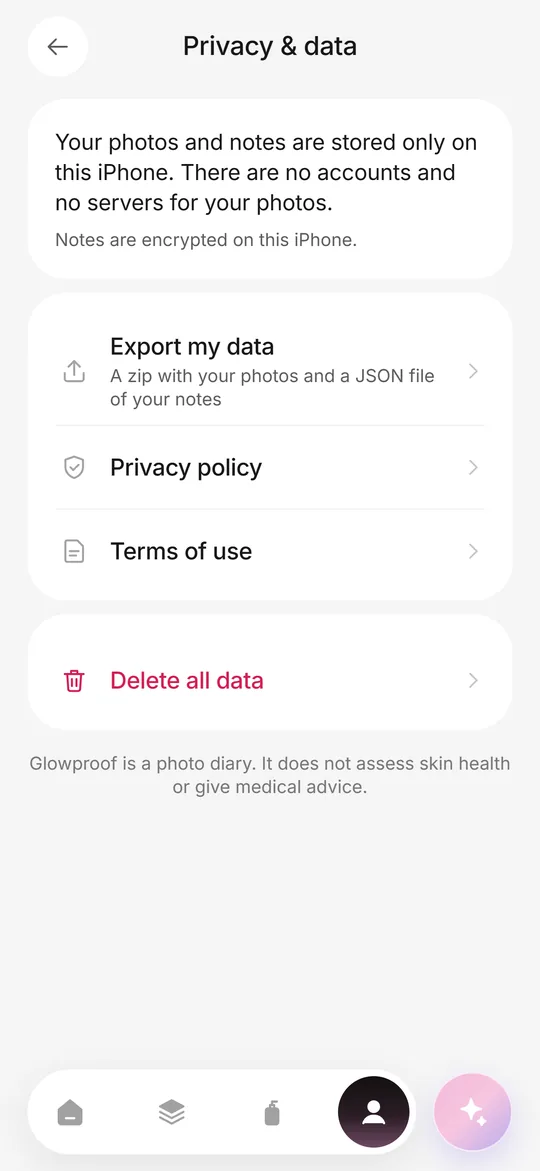
Open the Me tab, then Help and about. It has short answers on light, where your photos are and how to cancel, a Contact support button and the app version. Privacy policy and Terms of use are under Me, then Privacy and data.
How do I manage a subscription or purchase?
Open Me, then Subscription. From there you can manage the subscription, restore purchases, see plans or request a refund when an active App Store purchase exists. Apple handles billing, and you can also cancel in Settings, Apple ID, Subscriptions on your iPhone, at least 24 hours before renewal.
How do I contact support?
Use Contact support in Help and about, or email us using the contact block at the end of this page. Please include your iOS version and what you tapped before the problem. Do not send photos you want to keep private.
Contact us
Email support@dziby.com. Tell us the app name, your iPhone model and iOS version, and what happened. We read every message and usually reply within two business days.
Frequently asked questions
Why does the light check say my photo has different light?
The photo is darker, brighter, warmer or lit from one side compared with your Day 1 photo. It is advice only, so you can keep the photo or retake it by moving closer to the same window.
How do I replace my Day 1 photo?
Open Me, then My answers, and choose Replace Day 1 photo. The new photo takes over as the reference, and your Day 1 date and day count stay the same.
How do I compare two photos?
Open Timeline and tap Compare. The free plan compares Day 1 with your latest photo, and Pro lets you pick any two dates and zoom both to one area.
How do I restore my purchases?
Open Me, then Subscription, and tap Restore purchases, or use the same button on the paywall. It checks the Apple ID you are signed in with.
How do I cancel my subscription?
Go to Settings, Apple ID, Subscriptions on your iPhone, or Me, Subscription, Manage subscription in the app. Cancel at least 24 hours before the renewal date. Pro stays on until the paid period ends.
How do I export my photos and notes?
Open Me, then Privacy and data, then Export my data. You get a zip with your photos and a JSON file with your notes. Export is free.
How do I delete everything?
Open Me, Privacy and data, then Delete all data, and type DELETE to confirm. It erases photos, notes, trials, settings and reminders from the iPhone and cannot be undone.
Why are my reminders not arriving?
Notifications may be off for Glowproof. Open Me, then Reminders, and use the Open Settings button if the app shows that notifications are off. Reminders are scheduled on your iPhone and never exceed 2 a day.
Can I use Glowproof in Russian?
Yes. Open Me, then Language, and choose System, English or Russian.
Do I lose photos if I delete the app?
Yes, unless you exported them first. Photos live only on your iPhone and are excluded from iCloud backup by default, so use Export my data to keep a copy.
Keep exploring
 Private on deviceNo account, no photo server, iOS Data Protection, export and delete from the Me tab.FeaturesDaily photo, light check, side by side, routine, Product Trials, Glow Cards and private storage.