 Glowproof
How to choose a private photo journal app for iPhone: eight questions
A private photo journal app should answer eight questions clearly: does it need an account, where are photos stored, what is backed up, can you export and delete, can it be locked, does it analyze faces, does it use analytics, and what does sharing do by default. If an app is vague on any of these, look elsewhere.
Coming soon to iPhone
Why does the choice matter?
A photo journal holds images and words you would not post publicly. For some people that is a health diary, for others a record of a hard year. The app you choose decides who can see those photos, how long they exist and what happens if the company closes.
Most apps explain this in a privacy policy and a privacy label on the App Store listing. Reading both takes ten minutes and tells you more than the screenshots.
Question 1: Does it need an account?
An account means a server, and a server means your photos or your identity live somewhere else. Some apps need one for sync, and that can be fine if you want sync. If you do not, prefer an app that works without a sign-up. No account also means nothing to lose, forget or have breached.
Question 2: Where are the photos stored?
On the device, in the cloud, or both. On-device storage keeps control with you but loses the photos if the phone is lost without a backup. Cloud storage survives a lost phone and exposes photos to a company. Neither is wrong. Decide which risk you prefer, and look for a clear statement.
Question 3: What gets backed up?
iOS backs up apps by default to iCloud or a computer. An app may exclude its photos from backup, which protects privacy and loses data if you restore. Check what the app does and whether you can change it. Glowproof, an iPhone skin photo diary in development, excludes photos from iCloud backup by default and lets you turn the exclusion off in Photo settings.
Question 4: Can you export and delete?
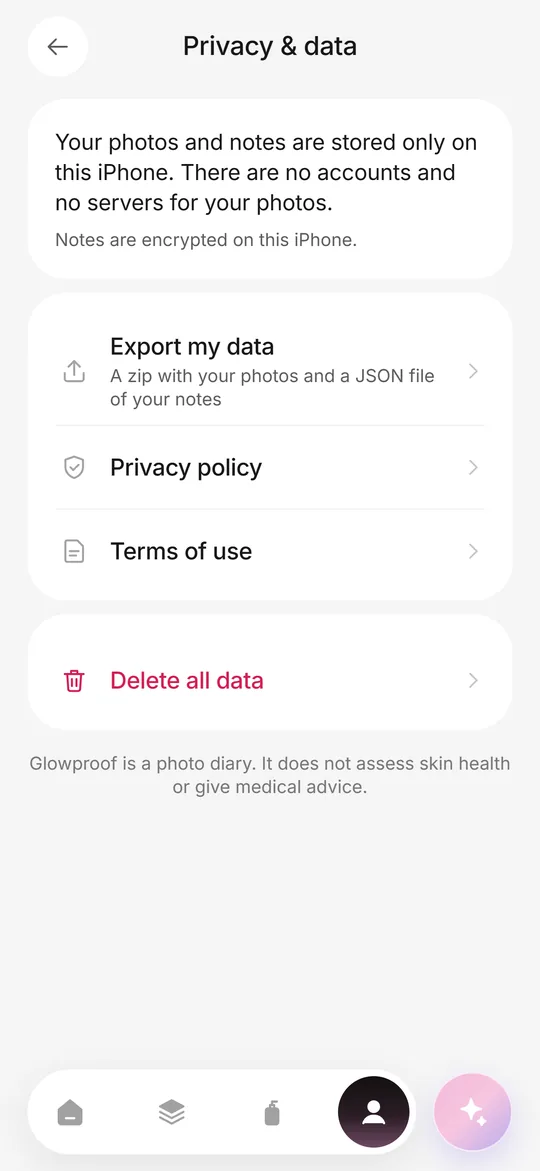
Look for both, in plain sight and free. An export gives you a copy in a format you can open elsewhere, such as a zip of images and a text file. A delete option should remove everything on the phone, including reminders and settings. Glowproof puts both under Me, then Privacy and data, and neither is behind the paywall.
Question 5: Can it be locked?
Some apps add their own passcode or use Face ID. Others rely on the phone's lock. If someone else uses your phone, an app lock is a real plus. Apple's own option to require Face ID on an app, in recent versions of iOS, is also worth knowing. The guide to hiding photos on iPhone covers the built-in tools.
Question 6: Does it analyze your face?
Some skin and beauty apps scan your face and report scores. That requires sending or processing face data. A diary app does not need to. Check whether the app detects faces, uses Face ID or ARKit, or claims to rate your skin. Glowproof reads only the brightness and warmth of a photo for its light check and does not detect, analyze or store anything about your face as data.
Question 7: Does it use analytics or ad networks?
Look at the App Store privacy label: Data Used to Track You and Data Linked to You. Third-party analytics and advertising SDKs are common. For a private journal, fewer is better. Glowproof states that it has no advertising, no tracking across apps or websites and no third-party analytics or advertising SDK. Its purchases go through Apple, and the billing service checks whether Pro is active.
Question 8: What does sharing do by default?
A journal app may offer cards or links. Check what the default is, especially for face photos. A safe default hides or blurs the face on the first share. Glowproof's cards default to Hide face the first time you share, and the choice stays in your hands. See Glow Cards.
How do you read the answers?
Count the clear answers. An app that is vague on three or more is not ready to hold sensitive photos. An app that gives plain answers on all eight, even with limits, is one you can decide about. Prefer honesty about trade-offs over a promise of perfect safety.
What do the App Store privacy labels show?
Apple requires developers to describe the data an app collects in a privacy label, and explains the categories in its app privacy details documentation. The label groups data into Data Used to Track You, Data Linked to You and Data Not Linked to You. A label that says Data Not Collected is the cleanest answer. A long list is a prompt to read the policy.
Remember that labels are filled in by the developer. They are a starting point. Compare them with the policy and, where you can, with how the app behaves.
What are warning signs?
A few patterns should slow you down. An app asks for a sign-up before you see any value. It requests access to all your photos when it only needs the camera. It promises to scan and rate your face. It has vague wording about sharing data with partners. Its free tier shows heavy ads. Any one of these does not make an app bad, but together they suggest that your photos are not the only thing it wants.
What about subscriptions and long-term access?
A subscription app may lock your own photos behind a paywall, which is a risk for a diary you want to keep for years. Check that you can export your data without paying. Glowproof, for example, keeps export free and visible, and says that a subscription is managed by Apple and is not cancelled by deleting data. Whatever app you choose, export a copy on a schedule so that you are never dependent on one company.
Frequently asked questions
What makes a photo journal app private?
No required account, local storage, clear backup behavior, export and delete options, no face analysis and no third-party analytics.
Is on-device storage safer than the cloud?
It avoids a company holding your photos, and it risks loss if you lose the phone without a backup. Export regularly.
How do I check an app's privacy?
Read the privacy label on the App Store listing and the developer's policy. Look for accounts, tracking and data linked to you.
Can I lock a journal app with Face ID?
Some apps offer their own lock, and recent iOS versions let you require Face ID to open an app from the Home Screen.
Does Glowproof analyze my face?
No. It reads brightness and warmth for a light check and does not detect or store anything about your face.
Keep exploring
 Private on deviceNo account, no photo server, iOS Data Protection, export and delete from the Me tab.How to Hide Photos on iPhone and Keep Them LockedSteps to hide photos on iPhone, lock the Hidden album, hide the album and choose a safer place for sensitive photos.Tracker app or journalPaper, notes, camera roll or app: strengths, weak spots and five privacy questions.