 Glowproof
Skincare tracker app, paper journal or camera roll?
A paper journal is private and flexible, a notes app is fast, a camera roll holds the photos you already take, and a photo diary app keeps words and matched photos together. Pick by what you will actually keep up, and check the privacy of any app that stores face photos.
Coming soon to iPhone
What are the options?
People searching for a skincare tracker app, a free skincare routine tracker or the best skincare tracker app are choosing among four basic tools. Each can work. The differences are friction, comparison and where your face photos end up.
There is also a hybrid that works for many people: photos in an app or album, and a few lines of notes on paper or in a notes app. It costs a little more effort and gives you full control of the words.
Count the effort honestly. The tool you open at 7 a.m. half asleep has to work in under a minute, or it will not survive the second week.
| Tool | Strength | Weak spot |
|---|---|---|
| Paper journal | Private, flexible, no screen | Cannot hold photos, hard to search |
| Notes app | Fast, searchable, always with you | Words and photos live apart |
| Camera roll | Photos are already there | Mixed with everything else, no fixed light or angle |
| Photo diary app | Photos, notes and dates together, guides for repeatable shots | Another app to open, privacy varies |
When is a paper journal the right choice?
When you want the simplest record and no phone involved. A paper journal suits a short daily entry, a product log and a weekly sentence. It fails at the visual part. If you want to see two faces side by side, you need photos, and then the question becomes how to keep them organized. For ideas on what to write, see skincare journal ideas.
If you go with paper, print your photos once a month and tape them next to the entries. It is a slow method, and some people find it makes them look more carefully.
Is the camera roll enough?
It can be, with discipline. Every photo has a date stored in its metadata (Wikipedia: Exif), so you can find them later. The weak points are that skin photos get buried among everything else, there is no reminder to take them, and nothing flags that the light was different. Face photos in a general library are also easy to share by accident.
A separate album helps. Take photos in a fixed home setup and name the album clearly.
A small habit makes it work better: after each photo, add it to a named album, and add a one-line note to a notes file with the same date.
What does a photo diary app add?
Structure. A guide for where to put your face, a reminder, a fixed place for notes and tags, and a way to compare two dates quickly. Glowproof is one example: it adds a face oval, a Day 1 outline, a light check on each photo and a slider comparison, and it leaves every judgement to you.
Apps also add risk, because they hold sensitive photos. That is why the next section matters more than the feature list.
Look for features that remove effort at the moment of the photo. A guide for position, a reminder and a saved place for a note are worth more than a long list of charts. Be wary of any app that promises to tell you what your skin is doing from a selfie. A photo cannot back up a medical-sounding claim like that.
Reminders deserve a second look. A reminder you set once and forget helps, while a stream of alerts drives people to delete the app.
What should I ask before trusting a tracker app with face photos?
Five questions cover most of it. Apple requires every App Store app to publish an App Privacy section describing the data it collects (Apple: App Privacy Details), and the page for any app is a good place to start.
Take your time with the App Store page before installing. Read the privacy section, the list of data linked to you and the support page. If a developer makes these hard to find, that already tells you something.
- Do I need an account? An app that needs none has no profile of you to leak.
- Are photos uploaded to a server, or stored on the phone?
- Does the app analyze my face or skin, and where does that analysis run?
- Which third parties get data, such as analytics or advertising SDKs?
- Can I export everything and delete everything, without paying?
What about free versus paid apps?
Free apps pay for themselves somehow, so read the privacy section more carefully. Paid features are not a problem in themselves, as long as the basics are not held hostage. A good test is whether export and delete stay available without paying. In Glowproof they do, while full history, any-date comparison and more trials sit behind the optional Pro plan, with prices shown by the App Store before you buy.
Whatever you choose, do not rely on a single copy. Export photos now and then, and keep the file somewhere you control.
How does Glowproof answer those five questions?
No account is needed. Photos stay on the iPhone, excluded from iCloud backup by default. The app does not analyze the face or skin and only reads the brightness and warmth of a photo for the light check. There is no advertising or third-party analytics SDK, and purchases are checked through a third-party billing service with an anonymous identifier. Export and delete are free, in Me, Privacy and data. The privacy policy has the details.
These are statements about the app's design as described in its policy. They are not a guarantee about any other app, so check each one yourself.
Glowproof is still in development, so these descriptions will be checked again against its App Store listing at release.
Which should I pick?
If you will not open another app, use the camera roll with a fixed setup and a notes file. If you like guidance and want your records together, use a photo diary app that passes the five questions. If you dislike screens, keep paper and add a photo once a week. In every case, the best tool is the one you still use in month two.
Plan an exit as well. Your records are yours, so keep dates on every photo and note, use plain words, and export in a common format, such as the zip with photos and a JSON file of notes that Glowproof produces. A diary you can read in any tool is safer than one locked in a format you cannot open.
By month two you will know whether it fits.
If you are not sure, run one tool for a month and keep the other as a backup. Switching is easy when the data is just dates, photos and a few plain words.
Frequently asked questions
Is a skincare tracker app better than a paper journal?
It depends on what you want. An app keeps photos, dates and notes together and can compare two days quickly. Paper is more private and has no screen.
Are skincare tracker apps safe for face photos?
It varies by app. Check whether you need an account, whether photos are uploaded, which third parties receive data and whether you can export and delete everything.
Where does Glowproof store photos?
On your iPhone only. There is no account and no server for photos or notes.
Does a skincare tracker diagnose skin problems?
A photo diary does not. Glowproof records your photos and notes and gives no medical information. For skin concerns, see a qualified professional.
Keep exploring
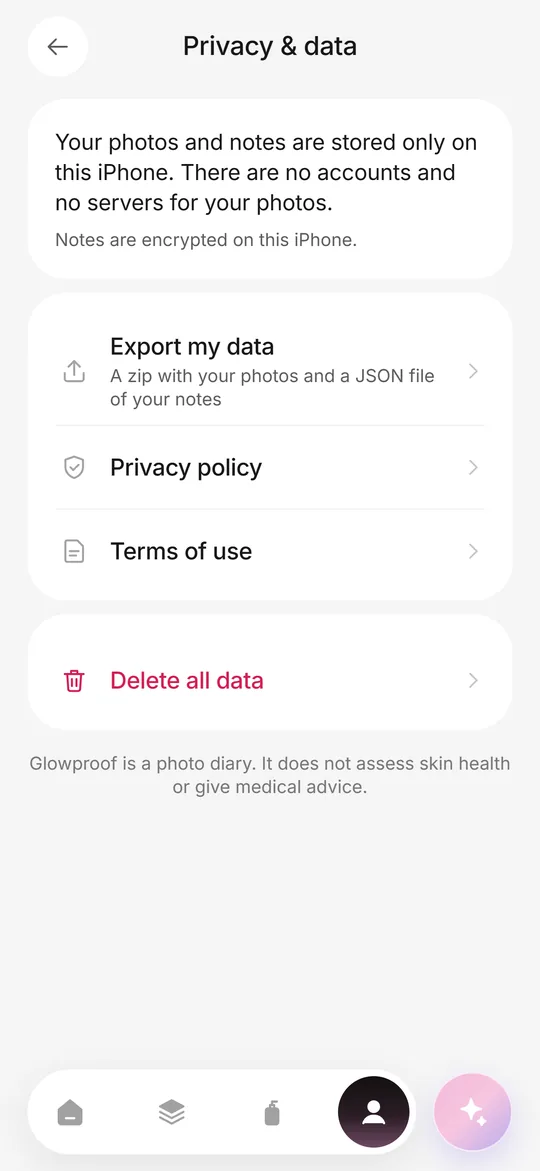 Private on deviceNo account, no photo server, iOS Data Protection, export and delete from the Me tab.PrivacyPhotos and notes stay on your iPhone. No account, no ads, no tracking across apps.
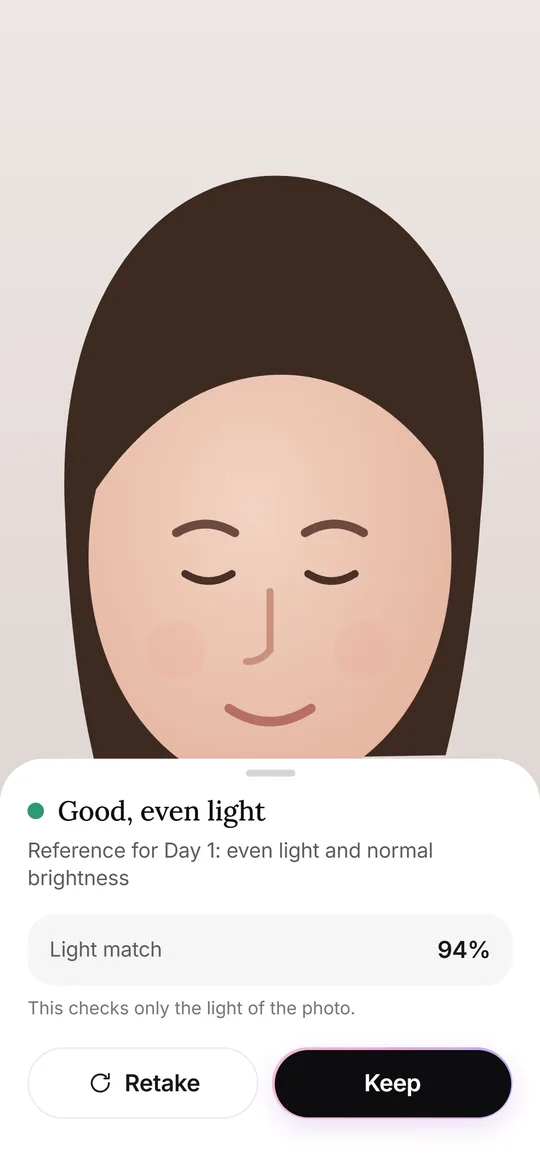 Glow CheckThe daily photo: guide, light check, your feel, tags and notes.